Color Effects
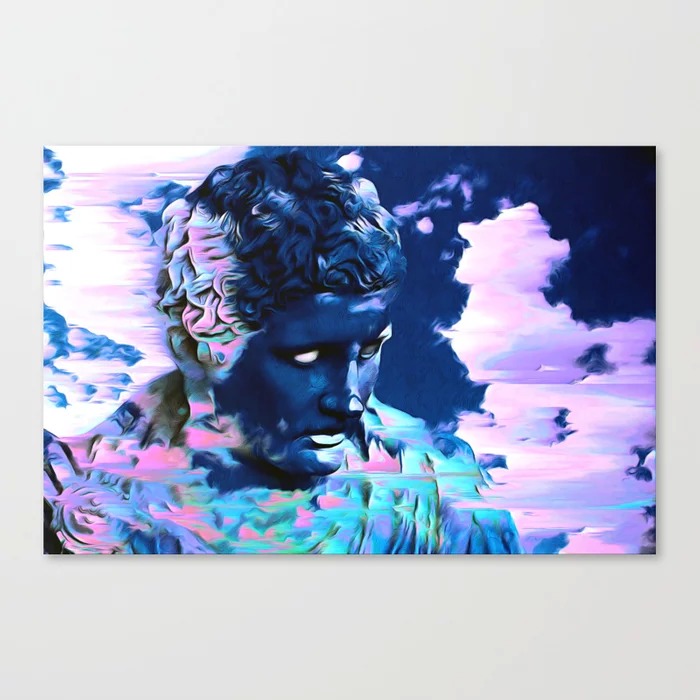
Glitch art color manipulation is the practice of deliberately breaking, misaligning, or reinterpreting color information in an image to evoke the aesthetics of digital error, analog signal failure, and chromatic noise. It is less about realism and more about turning technical artifacts into expressive color effects.
How Glitch Color Manipulation Works
Digital color is usually represented in channels (most often RGB: red, green, blue). Glitch color effects emerge when you:
- Offset or separate these channels so they no longer line up
- Corrupt or remix the underlying data that defines color values
- Re-map tonal ranges so shadows, midtones, and highlights shift into unexpected hues
Conceptually, you are interrupting the expected relationship between:
- Luminance (light/dark)
- Chrominance (hue/saturation)
- Spatial coherence (where color “should” be in the image)
The result: chromatic aberration fringes, neon shadows, bleeding edges, color banding, and other “broken” color behaviors associated with malfunctioning screens or damaged media.
Core Techniques
1. RGB Channel Splitting and Offsetting
This is the most iconic glitch color technique and works in almost any layer-based editor.
Basic workflow:
- Duplicate your base image into 2–3 layers.
- Isolate each layer to a single color channel (one red, one green, one blue), or use level/curve corrections to push each duplicate strongly toward a different hue.
- Set upper color layers to a blending mode like Screen or Lighten so the channels recombine visually.
- Nudge each layer a few pixels in different directions.
Visual effects you can target:
- Small offsets near line art for a subtle chromatic halo
- Dramatic offsets for a misregistered print / VHS tracking feel
- Channel offset only in selected areas (masked) for localized glitches
This same logic applies when using “chromatic aberration” filters: they manipulate channel alignment relative to edges to simulate lens or signal failure.
2. Tonal Remapping into Unnatural Color
By pushing curves, levels, or color balance, you can map:
- Shadows into cyan or magenta
- Midtones into saturated greens or yellows
- Highlights into pinks or blues
Useful tactics:
- Apply extreme Levels or Curves to a duplicated layer, then blend at low opacity for a contaminated color cast.
- Use gradient maps with discordant palettes (e.g. black → neon green, white → hot magenta) for stylized glitch posterization.
- Combine tonal remapping with RGB splitting for both structural and chromatic disruption.
3. Pixel-level Data Bending for Color Corruption
Glitch art often uses databending: editing the raw file with tools not meant for images, causing color and structure breakdown.
Color-focused strategies:
- Open an image file in a text or audio editor and alter small sections; save and reopen.
- Target regions (not headers) so the file stays readable but colors and blocks distort.
- Iterate: small corruptions, test, then layer multiple generations of bent images for dense color noise.
This produces banded gradients, blown-out neon patches, and irregular color shifts that look very different from regular filters.
4. Pixel Sorting and Scanline Effects
Pixel sorting tools and scripts can sort pixels by brightness or hue, creating smeared streaks of color.
Ideas:
- Sort only by hue in highlight regions to create dripping neon trails.
- Combine horizontal pixel sorting with channel offsets to feel like corrupted video frames.
- Add “scanlines” using small horizontal selections shifted and recolored for TV interference aesthetics.
Tools and Software
For color-focused glitch work, the most useful tools are:
- Adobe Photoshop / GIMP / Krita
Ideal for RGB splitting, layer blending, gradient maps, and masking. - Clip Studio Paint, Procreate, etc.
Support chromatic aberration-style workflows via duplicated layers and tonal correction. - Dedicated glitch apps and scripts
Mobile or desktop apps (e.g. glitch-specific editors, Processing sketches) handle databending, pixel sorting, and color channel scrambling with presets. - Text and audio editors
For manual databending of image files to force unpredictable color artifacts.
Practical Tips and Best Practices
-
Start non-destructively
Always duplicate your base layer or work on copies. Glitch color effects often benefit from backtracking and versioning. -
Control intensity
Strong color glitches are powerful but can overwhelm form. Use layer opacity, masks, and soft brushes to fade effects in and out. -
Work locally, not globally
Applying color distortion to only certain regions (edges, motion areas, background) creates contrast between “stable” and “broken” zones, which enhances impact. -
Combine analog and digital cues
Mix RGB splits with grain, banding, scanlines, or halftone patterns for a richer illusion of malfunctioning media. -
Build a glitch palette library
Save gradient maps and adjustment presets that produce your favorite glitch hues (acid greens, magentas, cyan shadows). Reusing and evolving them creates a recognizable style. -
Embrace unpredictability, but refine
Let accidents happen through databending or aggressive filters, then selectively keep what supports composition, readability, and mood.
By thinking in terms of channels, tonal zones, and controlled corruption, you can turn color glitches from random accidents into a deliberate, repeatable part of your glitch art practice.